95% of my AI work happens in a terminal now. A year ago, I would've laughed at that.
But here we are. Claude Code CLI has completely changed how I work. I spend almost all my AI time here—not in a web interface, not in an IDE plugin, but in the command line actually understanding what's happening.
Skills as Power-Ups
The capabilities are incredible. Edit files on your computer. Use skills to launch full workflows. Use MCP servers to access different services and apps. Both skills and MCPs have changed the game.
Skills are like power-ups. Working on something that needs to be branded for a specific client? They kick in automatically, formatting documents and PowerPoints with the right brand colors, guidelines, and styling.
MCP Servers Unlock Everything
With MCP servers, the possibilities are wild. Working in n8n, I can now have Claude Code build entire workflows for me. No longer manually adding nodes and configuring them one by one. I built a 20-node workflow in 3 minutes last week—something that used to take an hour of clicking and configuring.
Even better, paired with skills like n8n-workflow-builder and n8n-code-python, Claude Code not only builds the workflow but knows how to build it properly and code the nodes exactly right.
The Context Problem
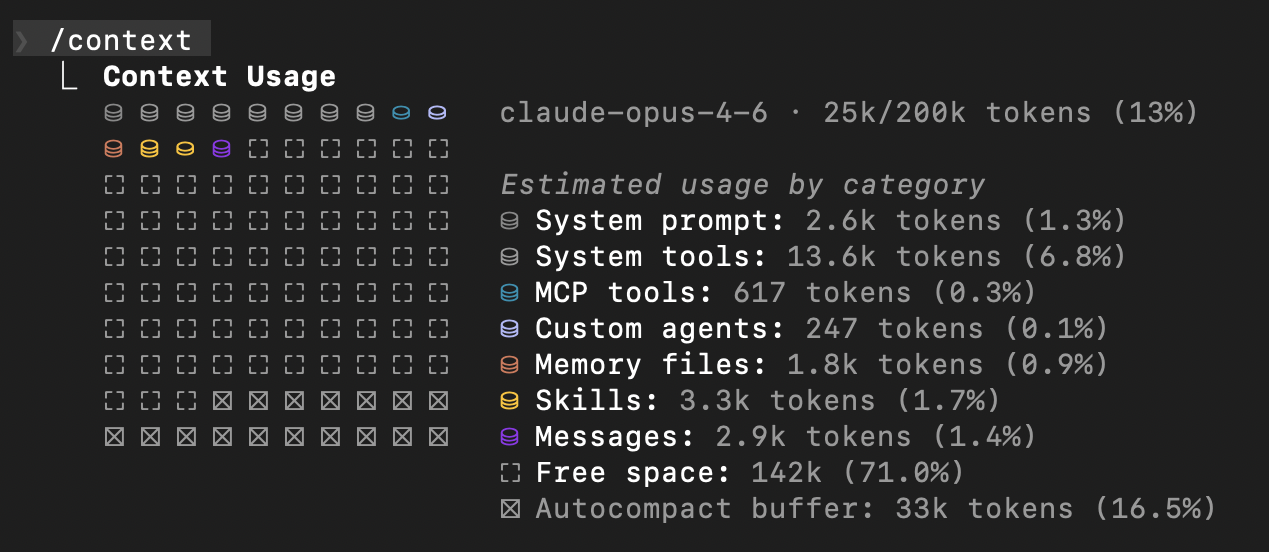
Here's the catch nobody tells you about: skills and MCP servers eat context. Fast. If you're not careful, you'll burn through your context window before you even start working.
My setup: 53 skills, 21 plugins, 11 MCP servers. Without optimization, that would destroy my context window at session start. Instead, mine starts at just 13%.
How to Stay Lean
The key to keeping context usage minimal? Two strategies:
For skills: Keep your skill descriptions and trigger words trim. Ask Claude Code to help you tighten them without losing effectiveness. This lets you run more skills for different scenarios without bloating your context.
For MCP servers: Use npx mcpick. You can disable your servers until you need them. Before starting a session, only enable the ones you'll actually use. Keeps MCP context usage minimal.
Final Thoughts
If you'd told me a year ago I'd be writing this from a CLI, I would've laughed. Now I can't imagine going back. If you're not using Claude Code, skills, or MCPs yet—start now.